By Jetson, Head of CRO at ThriveX
Reading time: 7 minutes. Last updated: May 2026.
Author's Note:
Start with analytics, not content. It is tempting to begin with an AI writing tool because it is the easiest to try, but without measurement in place there is no way to tell whether the extra output changed anything. This guide sequences AI adoption over 30 days so each step builds on the one before: week one sets up measurement, week two adds a content engine, week three brings in email and paid ads, and week four adds workflow automation and your first conversion fix. It also maps the six tool categories worth paying for and the pitfalls that stall most first attempts.
Lock in early access to the ThriveX AI Audit with Jetson for $49 before it goes to $99 at full launch.
Why Small Businesses Keep Delaying (And Why That Window Is Closing)
Most small business owners do not delay AI because they lack curiosity. They delay because the entry points feel unclear. Dozens of tools claim to be "AI-powered," and nobody maps out where to actually start.
The hesitation is understandable, but the gap is widening fast. According to McKinsey's 2025 State of AI report, 92% of executives plan to increase AI investments over the next three years, yet fewer than 1% of companies consider themselves fully AI-mature. That gap is where nimble small businesses can move faster than competitors.
This guide is not about theory. It covers the six tool categories that matter most, a 30-day implementation plan, and an honest cost-versus-output breakdown.
For the strategic layer underneath these tactics, read the AI marketing strategy guide for SMEs first.
The Six AI Tool Categories Every SMB Needs
Think in functions, not individual tools. Pick one tool per category and build from there.
1. Content Writing
The clearest ROI category for most small businesses. AI writing tools turn a rough outline into a full blog post, product description, or email draft in minutes.
ChatGPT Plus ($20/month): Best general-purpose option. Blog outlines, ad copy drafts, FAQ generation, and content repurposing. Saves roughly 12 hours/month for businesses producing four to six pieces of content.
Jasper AI ($59/month): Purpose-built for marketing copy, with brand voice memory and campaign templates. Higher cost, but saves up to 14 hours/month for high-volume copy teams.
2. Design
Visual content no longer requires a full-time designer.
Canva Pro ($15/month): AI background removal, Magic Write for captions, brand kit enforcement, and a template library covering social, email, and ads. Saves roughly 8 hours/month versus traditional design tools.
3. Paid Ads
WordStream's PPC benchmarksshows small business ad accounts consistently suffer from poor creative variety and under-tested copy. AI closes both gaps.
AdCreative.ai ($29/month): Generates ad image variants at scale using your brand colors and product photos. Effective for Meta and Google Display campaigns.
Meta Advantage+ (included in Meta Ads): Automates audience targeting and placement optimization at no extra cost. Enable it in your existing campaign settings.
4. Email Marketing
HubSpot's 2025 State of Marketing report puts average email ROI at $36 for every $1 spent. AI makes that math work at lower volume thresholds.
Mailchimp Standard ($17/month for up to 500 contacts): AI subject line optimizer, send-time optimization, and predictive segmentation. Saves around 6 hours/month on campaign setup.
5. Analytics
Data without interpretation wastes time. AI-assisted analytics surface the patterns your team would otherwise miss.
Google Analytics 4 (free): Non-negotiable for any business running paid media. The AI Insights feature proactively flags conversion anomalies.
Microsoft Clarity (free): Session recordings and AI-generated heatmap summaries show you exactly where users hesitate, rage-click, or abandon. The invisible friction AI audit framework shows how to turn this data into conversion improvements.
6. Workflow Automation
The force multiplier that connects everything else.
Notion AI ($10/month add-on): Converts meeting notes into action items, generates SOP drafts from bullet points, and summarizes research threads. Saves roughly 7 hours/month for a small team.
Cost-Benefit Reality Check
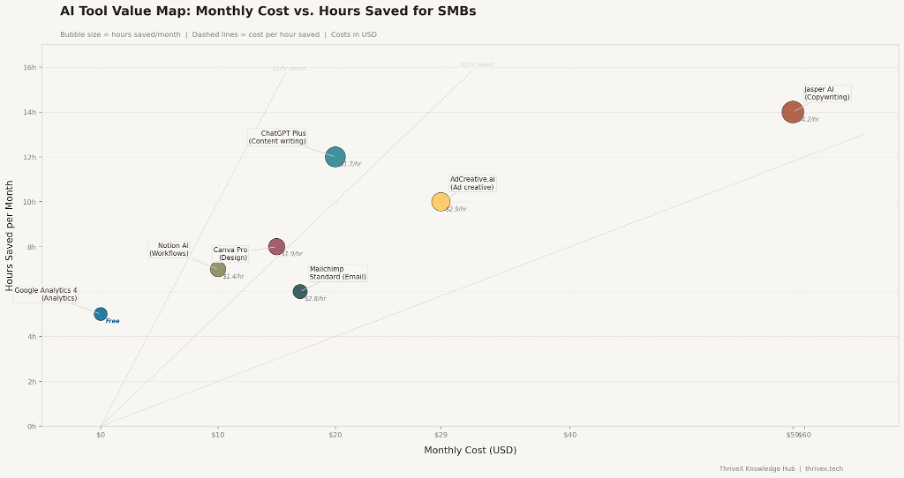
AI Tool Value Map: monthly cost in USD versus hours saved per month. Bubble size represents total time reclaimed. Dashed reference lines show cost per hour saved. Most tools fall under $3/hour saved, dramatically cheaper than hiring for equivalent output.
The standout finding: Google Analytics 4 and Microsoft Clarity are both free and together save roughly 10 hours/month of manual reporting and guesswork. For a business that values time at $25/hour, that is $250/month in recovered capacity at zero cost.
A full starter stack (ChatGPT Plus + Canva Pro + Mailchimp Standard + GA4 + Clarity + Notion AI) runs approximately $62/month. If that stack saves 50 hours/month at an effective internal rate of $30/hour, the return is roughly $1,500 on a $62 investment.
For a deeper look at why these efficiency gains compound into structural advantage, read The Efficiency Gap: Why Slow Adopters Fall Behind in 2026.
Where to Start: Your 30-Day AI Plan
The biggest mistake businesses make is implementing everything at once. The plan below is sequenced by dependency: each week's work builds on the previous.
Week 1: Analytics Foundation (Days 1-7)
Before building content or running ads, get visibility into what is already happening.
Days 1-2: Install Google Analytics 4. Configure at least three conversion events (form submission, button click, purchase).
Days 3-4: Install Microsoft Clarity. Create one heatmap for your highest-traffic landing page.
Days 5-7: Review your first Clarity session recordings. Identify the single biggest user drop-off point and note it. Every decision in weeks 2-4 flows from this.
Week 2: Content Engine (Days 8-14)
With baseline data in hand, build your AI-assisted content workflow.
Days 8-9: Set up ChatGPT Plus. Write your first blog post or product description using the prompt structure: role + audience + goal + constraints.
Days 10-11: Set up Canva Pro. Build your brand kit (colors, fonts, logo) and create three reusable social post templates.
Days 12-14: Produce one complete content package (blog post + three social images + one email) entirely using the new stack. Time yourself. This benchmark matters for week 4.
Week 3: Email and Paid Ads (Days 15-21)
Connect your content output to paid and owned distribution channels.
Days 15-16: Set up Mailchimp Standard. Import your contact list and build a two-email welcome sequence using ChatGPT-drafted copy.
Days 17-18: Enable Meta Advantage+ on your existing Meta campaigns. Do not change budget. Let the algorithm optimize delivery for one week.
Days 19-21: Upload your first AdCreative.ai variants as display ads. Run three variants minimum.
Week 4: Workflow, Review, and First CRO Fix (Days 22-30)
Connect the stack and make your first data-backed improvement.
Days 22-24: Set up Notion AI. Document your new content production workflow while it is fresh.
Days 25-27: Review GA4 data from the past three weeks. Which content drove the most engagement? Which ad variant won?
Days 28-30: Revisit the drop-off point you identified in week 1. Use Clarity data to diagnose the cause and implement one CRO fix. This is where AI insights convert directly into revenue.
Common Pitfalls to Avoid
Skipping analytics first. Teams that start with content tools before setting up GA4 and Clarity have no way to measure impact. Instrument first, always.
Publishing unedited AI output. AI-generated content is a first draft. Unedited copy lacks brand voice and generic claims will not differentiate you. AI does the heavy lifting; you do the quality check.
Subscription creep. Start with the minimum viable stack and add tools only when you have a specific, measurable problem they solve.
Driving AI-powered traffic into a broken site. AI ad tools can get more people to your landing page. If the page does not convert, you are paying to expose more people to a bad experience. Before scaling any AI-assisted ad spend, read CRO Before Ads. This is the single most common expensive mistake.
What Comes Next
A working AI stack is a starting point. The trends shaping where AI marketing goes through 2025 and beyond are covered in AI Marketing Trends 2025. In mobile-first markets across Southeast Asia, the convergence of AI content tools and conversational commerce is creating advantages that did not exist 18 months ago.
The businesses that benefit most are not those with the biggest budgets. They are the ones that instrument early, build repeatable workflows, and use AI to amplify human judgment rather than replace it.
Get a CRO Audit with Jetson for $49
What you get. A full AI-powered audit of your website and funnel, plus a 1:1 recommendation session with Jetson covering your top conversion and AI implementation opportunities.
Why now. Early access is $49. At full launch, it goes to $99.
Who it is for. DTC, B2B, and SaaS founders or marketing leads spending at least $5K per month on paid media, or planning to scale.
Book it here. Lock in early access at $49 before it goes to $99.
Further Reading in the ThriveX Knowledge Hub
AI Marketing Strategy for SMEs — The strategic framework that sits above these tactical tools.
AI Marketing Trends 2025 — Emerging shifts in AI-powered marketing and what small businesses should prepare for.
The Efficiency Gap 2026 — Why the gap between early and late AI adopters is compounding into a structural disadvantage.
CRO Before Ads — Why no AI tool fixes a broken conversion foundation.
Invisible Friction AI Audit — How to find and fix the friction points that AI analytics tools surface.
Frequently asked questions
What AI tools should a small business start with?
Begin with the free tools (Google Analytics 4 and Microsoft Clarity) for analytics, then add ChatGPT Plus for content. The full starter stack costs under $65/month.
How long does it take to see results from AI marketing tools?
Time savings appear within the first week. Measurable marketing results (improved conversion rates, lower cost per lead) typically appear within 30-60 days of consistent use.
Is AI marketing too expensive for small businesses?
No. A fully functional AI marketing stack can be built for $62/month. The free tools alone (GA4 and Clarity) deliver significant value at zero cost.
Do I need technical skills to use AI marketing tools?
No coding is required for any tool in this guide. ChatGPT, Canva, and Mailchimp are designed for non-technical users.
What is the biggest mistake small businesses make with AI?
Starting without an analytics foundation. Install GA4 and Microsoft Clarity first so every tool you add can be measured.
How is AI different from marketing automation?
Automation handles rule-based triggers (if X then Y). AI tools learn from patterns and generate outputs, such as copy, images, and predictions, that automation cannot produce.