By Jetson, Head of CRO at ThriveX
Reading time: 5 minutes. Last updated: August 2026.
Author's Note
Service businesses spend heavily to get someone to their contact page, then lose them at the last, easiest step to fix. A contact form is the shortest funnel a business has, click, fill, submit, and it still leaks leads constantly. This guide walks through why enquiry forms specifically fail at the final step and what to check before assuming the traffic itself was never serious.
If you want a direct read on your own form, the ThriveX AI Audit checks this specifically.
The Last Step Is Where Serious Leads Disappear
Most founders running a service business assume a low enquiry rate means the traffic wasn't genuinely interested. That assumption skips the most likely explanation.
A visitor who reaches your contact form has already done the hard part. They found you, decided you might be relevant, and clicked through with intent. Losing them here is not a traffic quality problem. It is a last-step friction problem, and it is one of the most expensive places in the entire funnel to lose someone, because the visitor was closer to converting than at any earlier stage. It is the same principle behind CRO before ads: fixing the step closest to the sale pays off before any new traffic does.
The same last-step abandonment shows up on landing pages that get real traffic and still don't convert, just earlier in the funnel than a contact form. A visitor who reached either one was already convinced enough to act.
This shows up constantly in B2B funnels specifically, where the enquiry form is often the only conversion point on the entire site. A weak product page can be forgiven if the form still works. A weak form loses the lead regardless of how good everything before it was.
What Actually Causes Form Abandonment at the Last Step
Baymard Institute's usability research found that mismatched form field widths, a field visually too short or too long for the expected answer, made test subjects second-guess whether they had misunderstood the question entirely. Confusion at the final step does not usually produce a support enquiry. It produces a closed tab.
This is the same friction category Baymard documented in checkout abandonment research more broadly, where forced account creation and unclear requirements were named among the leading reasons buyers abandon a process before completing it. A contact form and a checkout are different processes, but they fail for the same underlying reason: friction and uncertainty right before commitment.
Where Enquiry Forms Specifically Break
Four patterns show up repeatedly in service-business contact forms.
Asking for Information Too Early
Fields for budget, timeline, or company size before the visitor has even decided to trust you feel like a qualification gate, not an invitation. Visitors who aren't sure yet abandon rather than commit to information they haven't decided to share.
No Confirmation the Submission Worked
A form that submits without a clear confirmation message leaves the visitor unsure whether it worked. Some resubmit, creating duplicate leads. Others assume it failed and simply leave.
Field Labels That Don't Match Expected Input
A field labeled "Company" with no indication of whether a sole proprietor should type their own name creates exactly the kind of hesitation Baymard's research identified. The visitor pauses to figure out what's actually being asked, and a pause at the final step is often where the abandonment happens.
Mobile Fields That Are Genuinely Hard to Fill
Dropdowns and multi-select fields that work fine on desktop often become fiddly on mobile. For a service business where a large share of traffic arrives on mobile, a form that's annoying to complete on a phone loses leads that a desktop visitor would have submitted.
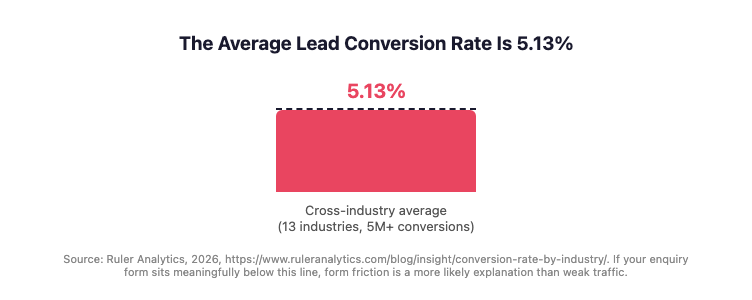
Figure 1 demonstrates the cross-industry average lead conversion rate of 5.13%, a benchmark worth checking your own enquiry form against before assuming low traffic quality is the cause.
Ruler Analytics' 2026 benchmark, tracking over 5 million conversions across 13 industries, puts the average lead conversion rate at 5.13%, with the mean pulled upward by high-converting verticals like legal and software that lean heavily on phone conversion rather than forms. For a service business relying on a form as its only conversion path, sitting meaningfully below that average is a signal worth investigating before assuming the traffic itself is the problem.
Is Your Contact Form Losing Leads at the Last Step?
Your enquiry form is likely losing leads if:
You ask for budget, timeline, or company details before establishing basic trust
There's no visible confirmation message after a visitor submits
Any field label could reasonably be misread or misunderstood
The form hasn't been tested on an actual mobile device recently
You have more fields than you actually use when following up with a lead
You don't currently track how many people start the form versus complete it
The Fix Sequence
Work through this before assuming your enquiry volume reflects real demand.
Fill out your own form on a mobile device and note every point of hesitation
Remove or reorder fields so trust-sensitive questions come after the initial ask, not before it
Add a clear, visible confirmation message immediately after submission
Check that every field label matches what a first-time visitor would expect it to mean
Track start-to-completion rate on the form itself, not just total submissions
Re-test after each change individually to confirm which fix actually moved the number
How This Plays Out for a Malaysian SME
Before: A KL-based corporate training provider had steady traffic to its enquiry page from LinkedIn and referral links, but submissions stayed flat month over month despite the traffic holding steady.
Diagnosis: The form asked for company size, budget range, and preferred training dates before asking what the visitor actually wanted training on, front-loading commitment-heavy questions before the visitor had decided the provider was worth engaging with.
Fix: The form was reordered to ask the training topic first, moved budget and scheduling questions to a follow-up email instead of the initial form, and added a clear confirmation message after submission.
After: Submission rate on the same traffic volume increased, and the business began capturing enquiries from visitors who had previously abandoned the form partway through.
This example is illustrative, not drawn from a documented ThriveX case study. Real case study data is available at thrivex.tech/casestudy.
Where the ThriveX AI Audit Fits
A low enquiry rate looks identical whether the cause is weak traffic or a broken form, and most founders cannot tell the difference just by watching the submission count. Fixing the wrong one wastes budget on more traffic aimed at the same leaking form.
This is where the invisible friction AI audit fits. As a CRO and AEO diagnostic consultancy, ThriveX reviews whether your enquiry form is genuinely the constraint, and names the specific friction points costing you leads at the last step.
If your enquiry form gets views but few submissions and you're not sure why, the audit is priced at $49 during beta, with standard pricing at $99, and built to answer that directly.
FAQ
Why do people abandon a contact form at the last step?
The most common causes are being asked for sensitive information like budget before trust is established, unclear field labels that cause hesitation, no confirmation that the submission worked, and forms that are difficult to complete on mobile. Each of these interrupts a visitor at the exact moment they were closest to converting.
How is form abandonment different from low traffic quality?
Low traffic quality means visitors weren't genuinely interested to begin with. Form abandonment means a genuinely interested visitor reached the final step and still didn't complete it. Tracking start-to-completion rate on the form itself, not just total traffic to the page, is what distinguishes the two.
What should I fix first on an underperforming enquiry form?
Start with anything that causes hesitation or confusion at the point of submission, unclear labels, missing confirmation messages, and fields that don't work well on mobile. These interrupt visitors who have already decided to convert, which is a higher-value fix than earlier-funnel changes.
Does shortening a form always improve submissions?
Not always. A shorter form with unclear questions can perform worse than a longer form with clear ones. The sequence and clarity of the questions matter more than the raw field count, which is why testing changes individually rather than assuming fewer fields automatically helps is the safer approach.
Further Reading
CRO Before Ads: Why Malaysian DTC Brands Burn Marketing Budget at the Wrong End of the Funnel: https://www.thrivex.tech/blogs/cro-before-ads
Why B2B Funnels Leak Revenue (And How to Fix the Gaps That Cost You Deals): https://www.thrivex.tech/blogs/malaysian-b2b-funnel-leakage
Why Your Landing Page Is Not Converting: https://www.thrivex.tech/blogs/landing-page-not-converting
The Invisible Friction AI Audit: https://www.thrivex.tech/blogs/invisible-friction-ai-audit