Why Did My Meta Ads Stop Working?
By Susan, Head of Paid Ads at ThriveX
Reading time: 6 minutes. Last updated: October 2026.

Author's Note
I build and test 10 new ad creatives a month across the accounts I run, and review which angles are working every two weeks, so a fresh concept is usually ready when an ad starts to tire. When an ad that was working stops, Meta will tell you directly whether the audience has seen the creative too many times, using a status most advertisers have never looked at. This guide covers where to find it, what the thresholds actually mean, and what Meta says to do next, which is not what most people do. If you want a direct read on whether the problem is the creative or what happens after the click, the ThriveX AI Audit checks this specifically.
Meta Already Told You, in the Delivery Column
An ad that stops converting is usually read as an audience problem or an algorithm change. Before assuming either, open Ads Manager and look at the Delivery column for the ad set or ad.
Meta assigns a status there when it believes your audience has seen the same ad too many times, and it defines the thresholds precisely. When cost per result is higher than ads you have run in the past but less than twice as much, you will see a Creative limited status. When cost per result is more than or equal to twice as much as your past ads, you will see a Creative fatigue status.
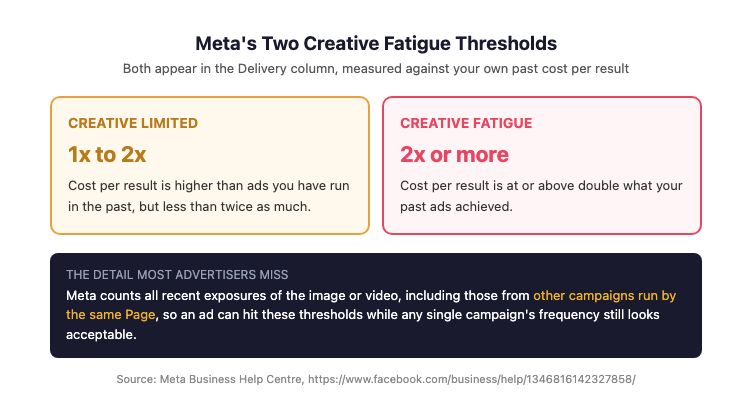
Figure 1 demonstrates the exact thresholds Meta uses to assign creative fatigue statuses in the Delivery column, giving advertisers a measurable point at which creative, rather than audience or budget, is the confirmed cause.
That is a diagnosis with a number attached, sitting in the account, free to check. Most advertisers spend a week changing budgets and audiences before looking at it.
What Creative Fatigue Actually Means
One detail in Meta's definition catches advertisers out. Meta states that it considers all recent exposures of the ad's image or video, "including those from other campaigns from your Page." Running the same creative across a prospecting campaign and a retargeting campaign accumulates fatigue faster than the frequency on either campaign alone suggests.
For a benchmark on the exposure side, Meta advises aiming for a frequency of 2 to 3 ad impressions per person over a 7 day period to maintain optimal engagement.
Where "Stopped Working" Actually Comes From
Four causes account for most of it.
The Creative Genuinely Fatigued
The audience saw it enough times that response fell. This is the case the Delivery column names directly, and it is the most common one for accounts running a small creative pool against a narrow audience.
The Same Creative Is Running in Multiple Campaigns
Because Meta counts exposures across campaigns from the same Page, an ad can reach fatigue while each individual campaign's frequency still looks acceptable. The metric you are checking is not the metric Meta is judging.
The Audience Is Too Small for the Spend
A narrow audience reaches its fatigue threshold faster at the same budget. Nothing about the creative changed; the pool of people who had not yet seen it ran out.
It Was Never the Creative
Cost per result rises when conversions fall, and conversions fall for reasons that have nothing to do with the ad. A changed landing page, a broken form, or a checkout issue produces the same symptom, which is why a landing page that stops converting is worth ruling out before rebuilding creative.
What Meta Says to Do, and What Most People Do Instead
Meta adds a note most advertisers get backwards: "Keeping your original ad active instead of pausing or turning it off may maximise results." The instinct on seeing a fatigue status is to switch the ad off. Meta's guidance is to add alongside it rather than replace it.
On what "materially different" means in practice, research produced by Meta with AppsFlyer and Dentsu Creative, analysing 1.1 million creative variations, found campaigns using a diverse set of creatives across formats and messaging types saw up to a 32% improvement in CPA and a 9% increase in incremental reach. Different formats and different messages, not different crops.
In my own testing, the unit is a combination of copy angle and visual style rather than a single message, because testing one angle at a time misses how the two work together. The goal is the combination of message and visual that produces the lowest cost per qualified result for that audience, with the next combination already in testing before the current one tires.
Diagnostic Checklist
Check these before rebuilding anything:
Does the Delivery column show Creative limited or Creative fatigue on the affected ad set or ad?
Is your current cost per result roughly double what the same account used to achieve, which is Meta's fatigue threshold?
Is the same image or video running in any other campaign from the same Page?
Is 7 day frequency running above 2 to 3 impressions per person?
Did anything change on the landing page, form, or checkout in the same window?
Is your creative pool genuinely different concepts, or variations of one?
Fix Sequence
Check the Delivery column first, since it either confirms or rules out fatigue in seconds
Rule out a post-click cause by confirming nothing changed on the destination page in the same period
Check whether the same creative is running elsewhere on the Page and consolidate if it is
Add a materially different creative concept rather than a new crop or colour variant
Leave the original ad running rather than pausing it, per Meta's own guidance
If frequency is the constraint rather than the creative, expand the audience before adding more budget
What This Check Looks Like in Practice
Say a Reels ad delivered steady results for a month and then cost per result started climbing week after week. Here's how the checklist above tells you whether it's fatigue or something else.
Start with the Delivery column. If it shows Creative fatigue, Meta is telling you cost per result has reached roughly double what the account used to achieve. If it shows nothing, fatigue is unlikely and the cause is probably elsewhere.
Next, search the Page's other campaigns for the same video. An ad running in both a prospecting and a retargeting campaign reaches the same people more often than either campaign's own frequency figure shows.
Then confirm nothing changed on the destination page in the same window. A slower page or an edited booking form produces the same climbing cost per result as tired creative.
If fatigue is confirmed, add one genuinely different concept and leave the original ad running rather than pausing it.
Where the ThriveX AI Audit Fits
Creative fatigue and a broken conversion path produce an identical symptom: cost per result climbing on a campaign that used to work. The Delivery column separates them in seconds, and when it comes back clean, the cause is past the click.
This is where the ThriveX AI Audit fits. ThriveX reviews the destination the traffic arrives at, so an account is not rebuilding creative to fix a problem that was never in the ad, the same sequencing point behind more ad spend not meaning more conversions. If clicks are still arriving but sales are not, the checks in why your website gets traffic but no sales apply directly.
If your Meta ads stopped working and the Delivery column looks fine, the ThriveX AI Audit is priced at $49 during beta, with standard pricing at $99.
FAQ
How do I know if my Meta ads have creative fatigue?
Check the Delivery column in Ads Manager. Meta shows Creative limited when cost per result is higher than your past ads but under double, and Creative fatigue when it reaches double or more. That status is Meta telling you directly that the audience has seen the creative too many times.
What frequency is too high on Meta ads?
Meta advises aiming for 2 to 3 ad impressions per person over a 7 day period to maintain optimal engagement. Above that range, engagement typically falls and cost per result rises, though the exact point varies by audience size and creative.
Should I pause a fatigued ad?
Meta's own guidance says keeping the original ad active instead of pausing or turning it off may maximise results. The recommended move is to add a materially different creative alongside it and let delivery shift, rather than switching the tired ad off.
Why does my ad show fatigue when frequency looks fine?
Meta counts all recent exposures of the image or video, including from other campaigns run by the same Page. If the same creative is live in more than one campaign, total exposure is higher than any single campaign's frequency figure shows.
Further Reading
Why More Ad Spend Doesn't Mean More Conversions Without CRO First: https://www.thrivex.tech/blogs/why-more-ad-spend-doesnt-mean-more-conversions
Why Is My Advantage+ Campaign Not Converting?: https://www.thrivex.tech/blogs/advantage-plus-not-converting
Why Your Landing Page Is Not Converting: https://www.thrivex.tech/blogs/landing-page-not-converting
Why Your AI UGC Ads Aren't Converting: https://www.thrivex.tech/blogs/ai-ugc-ads-not-converting
Why Is My Website Getting Traffic But No Sales? What Google Analytics Cannot Tell You: https://www.thrivex.tech/blogs/invisible-friction-ai-audit