Is Your Website Ready for 11.11? What to Fix Before You Scale Ads
By Jetson, Head of CRO at ThriveX
Reading time: 6 minutes. Last updated: October 2026.

Author’s Note
Most 11.11 preparation guides are written for marketplace sellers: stock, vouchers, listing photos. If you sell through your own website, the risk sits somewhere else. You are about to pay more than usual for traffic, on the one day your visitors are most impatient and most likely to compare you against a cheaper marketplace listing. This guide covers the five fixes worth making to your own site before you scale ads for 11.11, and the order to make them in. If you want a direct read on where your site is leaking before the sale, the ThriveX AI Audit checks this specifically.
Why 11.11 Exposes Your Website
More Malaysians are shopping online, and they are shopping on value. Ipsos Malaysia’s 2025 e-commerce study found the number of e-commerce shoppers rose 16%, with nearly two-thirds of Malaysians now buying online, and that shoppers now prioritise promotions and value.
That combination is exactly what 11.11 concentrates into one day. Visitors arrive from ads with a discount already in mind, often on a phone, and often with a marketplace tab open in the background. Any friction that costs you a few sales on a normal week costs you many more when the traffic is several times higher and the buyer is actively comparing.
The baseline is already steep. Baymard Institute puts the average documented cart abandonment rate at 70.22%, and finds that large ecommerce sites can gain a 35.26% increase in conversion rate through better checkout design alone. On a sale day, that gap is paid for with your most expensive traffic of the year.
What Changes on Sale Day
Three things shift when 11.11 traffic arrives.
More of the Traffic Is Paid
Brands raise ad budgets for the sale, so a larger share of visitors cost money to bring in. Every visitor who leaves without buying is a cost you already paid, which is why increasing ROAS without increasing ad spend starts with conversion, not budget.
More of It Is on Mobile
Sale traffic from social ads lands on phones. A page that loads slowly or hides the buy button below a long scroll on a small screen loses visitors before they see the offer.
The Buyer Is Comparing
A promotion-driven buyer checks the total price, the delivery date, and whether a marketplace sells the same thing cheaper. Anything unclear, especially shipping cost, sends them to compare and they rarely come back.
The Five Fixes to Make Before You Scale Ads
1. Mobile Speed on Your Sale Landing Pages
Test the exact pages your ads will send traffic to, on a phone, on mobile data. Heavy hero images, sliders and pop-up apps are the usual causes of a slow first screen.
2. The Offer Above the Fold on Mobile
The discount, the product, and the buy button should all be visible on the first phone screen. If a visitor has to scroll to find out what the deal is, many will not.
3. Total Cost Before Checkout
Show shipping cost and delivery timing on the product page, not for the first time at checkout. Unexpected costs at the final step are one of the most common reasons buyers abandon, and on a comparison day they are the easiest reason to leave.
4. Checkout Without Unnecessary Steps
Remove forced account creation, extra form fields and anything else between “add to cart” and “pay”. The add-to-cart step itself matters too: how to increase add-to-cart rate covers the product page side, and why customers abandon checkout covers the final step.
5. Tracking That Actually Fires
Place a real test order before the sale and confirm the purchase appears in your ad platform and analytics. If tracking breaks on the busiest day of the year, your ads optimise blind and you cannot tell afterwards which campaigns made money.
Diagnostic Checklist
Your website is not ready for 11.11 traffic if:
Your sale landing page takes noticeably long to show its first screen on mobile data
The discount and buy button are not both visible on the first phone screen
A buyer first sees the shipping cost at checkout
Checkout requires creating an account
You have not placed a test order in the last two weeks
Your ad links point to the homepage rather than the specific sale product or collection
Nobody knows your current mobile conversion rate
Fix Sequence
This week: place a test order and confirm tracking fires end to end
This week: open every page your ads will link to on a phone and fix what slows the first screen
Next week: move shipping cost and delivery timing onto product pages
Next week: remove forced account creation and any non-essential checkout fields
Before ads go live: point each ad to the exact sale page it promises, the mechanism behind a landing page that is not converting
Only then raise budget, and compare mobile conversion rate on sale day against your normal week
What This Check Looks Like in Practice
Say your ads are ready for 11.11 and you have set aside a bigger budget than usual. Here’s how the checklist above finds the leaks in about an hour.
Start on your phone, on mobile data, and open the page your main ad links to. Note how long the first screen takes, and whether you can see the discount and the buy button without scrolling.
Next, add the product to cart and go all the way to the payment step without paying. Count the screens, note every field you are asked to fill, and note the moment you first see the shipping cost.
Then place a real low-value test order and check that the purchase appears in your ad platform within a few hours.
Whatever you found in those three steps is your fix list for this week. Budget comes after it.
ThriveX’s Pretty Little Fit engagement shows what that list can be worth. 84% of the brand’s visitors arrived on mobile, and mobile conversion sat at 0.8%. After a diagnostic-led sprint that fixed friction including forced account creation at checkout, mobile conversion rose to 3.1% and cart abandonment fell from 78% to 56%. The full breakdown is in the Pretty Little Fit case study.
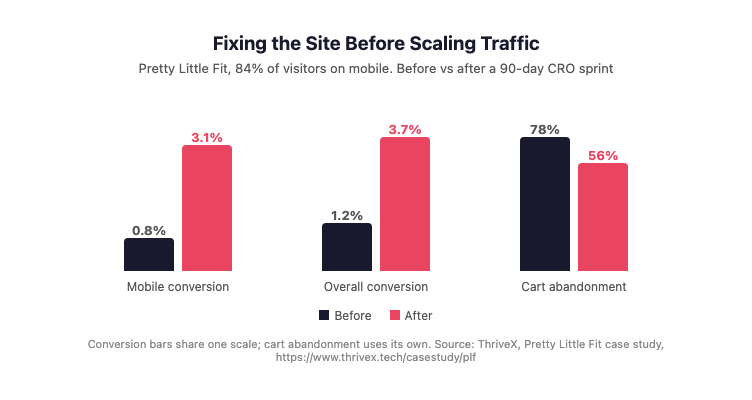
Figure 1 demonstrates the conversion gains from fixing website friction before scaling traffic, using ThriveX’s Pretty Little Fit case study, where 84% of visitors arrived on mobile.
Where the ThriveX AI Audit Fits
The most expensive time to discover a conversion leak is the day you are paying the most for traffic. Most of the fixes above take days, not hours, which is why they need to happen before 11.11 rather than during it.
This is where the ThriveX AI Audit fits. ThriveX reviews the pages your sale traffic will land on, finds where mobile visitors are dropping off, and gives you a prioritised fix list, so the bigger budget goes into a site that can convert it. The same thinking sits behind why more ad spend doesn’t mean more conversions.
If you are planning to scale ads for 11.11, the ThriveX AI Audit is priced at $49 during beta, with standard pricing at $99.
FAQ
How should I prepare my website for 11.11?
Fix the pages your ads will send traffic to before you raise budget. Check mobile load speed, make the offer and buy button visible on the first phone screen, show shipping cost on the product page, remove forced account creation at checkout, and place a test order to confirm tracking works.
When should I start preparing for 11.11?
At least three to four weeks before the sale. Tracking checks and mobile speed fixes can happen in the first week, while checkout and product page changes need time to build and test. Leave the final week for ads, not website fixes.
Should I send 11.11 ad traffic to my homepage?
No. Send each ad to the specific product or sale collection it promotes. A buyer who clicks on a discount and lands on a general homepage has to search for the offer again, and on a sale day many will compare elsewhere instead.
What matters more for 11.11, the discount or the website?
Both, but the website decides how much of the discount’s traffic you keep. A strong offer on a slow, confusing page still loses buyers at checkout, while the same offer on a fast, clear page converts more of the traffic you pay for.
Further Reading
How to Increase ROAS Without Increasing Ad Spend: Fix Conversion Before You Scale: https://www.thrivex.tech/blogs/cro-before-ads
How to Increase Add-to-Cart Rate: 6 Product Page Fixes for Malaysian Stores: https://www.thrivex.tech/blogs/add-to-cart-bottleneck
How to Reduce Cart Abandonment in Malaysia: 3 Checkout Fixes That Actually Work: https://www.thrivex.tech/blogs/cart-abandonment-checkout-fixes
Why Your Landing Page Is Not Converting: https://www.thrivex.tech/blogs/landing-page-not-converting
Why Is My Website Getting Traffic But No Sales? What Google Analytics Cannot Tell You: https://www.thrivex.tech/blogs/invisible-friction-ai-audit