By Susan, Head of Paid Ads at ThriveX
Reading time: 5 minutes. Last updated: October 2026.
Author's Note
A Google Ads account with steady clicks and an empty Conversions column makes most advertisers reach for the bid strategy or the budget first. That is usually the wrong end to start. Before changing anything in the campaign, you need to know whether conversions are being recorded at all, whether the clicks came from the right searches, and what happened on the page after the click. This guide covers those checks in order. If you want a direct read on the page side, the ThriveX AI Audit reviews what visitors see after they click.
Why Am I Getting Google Ads Clicks But No Conversions? The Short Answer
Usually because conversions are not being recorded, the clicks come from searches that were never going to buy, or the landing page loses people after the click. Check them in that order, because a tracking fault makes every other number meaningless.
The five usual causes:
Tracking is broken or delayed: the conversion action is unverified, inactive or still processing
The wrong searches trigger your ads: broad keywords match people who are not shopping
The page does not match the search: the visitor lands somewhere that does not answer what they typed
The checkout or form loses them: extra costs, account creation or a long form
There is not enough data yet: too few clicks or too few days to judge
Is My Google Ads Conversion Tracking Actually Working?
Check this first. In Google Ads, open Goals, then the conversions summary, and read the status next to each conversion action. Google says "Inactive" and "Needs attention" usually point to a tag or setup problem, while "No recent conversions" "might mean no paid ad clicks led to conversions in the last 7-14 days" and "isn't always a tracking error but could be due to low traffic or campaign settings".
Timing matters too. Google Ads reports conversions by the date of the click, not the date of the conversion, and Google advises allowing for a 24 to 48 hour processing delay before comparing results. A buyer who clicks today and orders next week is credited to today, so the last few days always look weaker than they will end up.
Are My Clicks Coming From the Right Searches?
Find out in the search terms report, which lists the searches that triggered your ads and the keyword each one matched. Google suggests adding irrelevant terms as negative keywords so your ads stop showing for them. Low-volume searches are hidden for privacy, so the report never shows every search.
Google's own example is an optometrist adding "wine glasses" and "drinking glasses" as negative keywords to stop paying for people who are not shopping for eyeglasses. The same logic applies to "free", "job", "DIY" or "how to" searches that look relevant and never buy.
Does My Landing Page Match What People Searched?
If the clicks are from the right searches and tracking works, the page is next. Google defines landing page experience as "how relevant and useful your landing page is to people who click your ad". A search for a specific product that lands on the homepage, or a search for a price that lands on a page with no price, sends the visitor back to the results.
Match each ad group to the page that answers its search most directly. The page-side causes are covered in why your landing page is not converting.
What Loses Buyers After They Land?
For online stores, the checkout. Baymard Institute puts the average documented cart abandonment rate at 70.22%, based on 50 studies, and the most common reason buyers give, excluding those who were just browsing, is extra costs such as shipping, tax and fees.
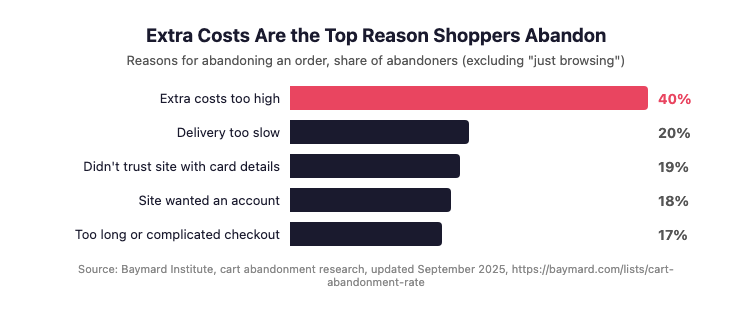
Figure 1 demonstrates that extra costs such as shipping, tax and fees are the most common reason shoppers abandon an order, cited by 40% of abandoners who were not just browsing, which is why paid clicks can fail at checkout rather than in the campaign.
For lead generation, the equivalent is the enquiry form: too many fields, no reply time, or a phone number that goes unanswered. The fixes are in why your contact form is losing you leads.
Diagnostic Checklist
Your Google Ads clicks are not converting because of the setup, not the market, if:
Your main conversion action shows Unverified, Inactive or Needs attention
You judge results from the last few days without allowing for conversion delay
You have not opened the search terms report in the past month
Your negative keyword list is empty or short
Several ad groups send traffic to the homepage
Shipping costs or fees appear only at the last checkout step
Your enquiry form has more fields than your sales team uses
Fix Sequence
Confirm tracking: check the status of each conversion action, then place a test order or enquiry and confirm it is recorded
Allow for delay: judge performance on a period that ended at least a few days ago
Clean the searches: review the search terms report and add irrelevant terms as negative keywords
Match pages to searches: send each ad group to the page that answers its search most directly
Remove checkout surprises: show shipping and fees before the final step
Shorten forms: keep only the fields your team uses to follow up
Re-check after two to four weeks before changing bids or budget
What This Check Looks Like in Practice
Say a campaign has spent for a month with plenty of clicks and almost no recorded sales. Start in the conversions summary: if the purchase action is not Active, place a test order and see whether it appears after the processing delay. If it never appears, the problem is tracking, and nothing else is worth judging yet.
If tracking works, open the search terms report for the same month and sort by cost. Mark every search a buyer would not type, add those as negative keywords, and note how much of the spend they took.
Then open the landing page for your top ad group on a phone, search as a buyer would, and go as far as the checkout or form. Wherever the page fails to answer the search, or a cost or field appears unexpectedly, that is the fix for the month. The same order of checks sits behind why more ad spend does not mean more conversions.
Where the ThriveX AI Audit Fits
Google Ads shows clicks, cost and conversions. It does not show what the visitor read on your page, what made them hesitate, or where the checkout or form lost them. The ThriveX AI Audit reviews that post-click side, so the next change targets the step that is losing buyers.
If your Google Ads clicks are not turning into sales or enquiries, the ThriveX AI Audit is priced at $49 during beta, with standard pricing at $99.
FAQ
Why am I getting Google Ads clicks but no conversions?
Usually because conversions are not being recorded, the ads match searches from people who are not buying, or the landing page loses visitors. Check tracking first in the conversions summary, then the search terms report, then the page and checkout. Change bids only after those checks.
How do I know if Google Ads conversion tracking is working?
Open the conversions summary under Goals and read each action's status. Inactive or Needs attention usually means a tag problem. No recent conversions can mean no ad clicks converted in the last 7 to 14 days. Place a test conversion and confirm it is recorded after the processing delay.
Why do recent days show fewer conversions?
Google Ads credits conversions to the date of the click, and processing can take 24 to 48 hours. A buyer who clicks today and buys next week is added to today later, so the most recent days look weaker than they will end up. Judge results on a period that ended a few days ago.
Should I change my bid strategy if I get no conversions?
Not first. Smart bidding learns from conversion data, so it cannot fix tracking that records nothing or clicks from the wrong searches. Confirm tracking, clean the search terms with negative keywords and fix the landing page, then judge the bid strategy on two to four weeks of clean data.
Further Reading
Why Are My Facebook Ads Not Converting?: https://www.thrivex.tech/blogs/why-are-my-facebook-ads-not-converting
Why Did My Google Ads Performance Drop After the AI Max Switch?: https://www.thrivex.tech/blogs/google-ads-ai-max-performance-drop
Why Your Landing Page Is Not Converting: https://www.thrivex.tech/blogs/landing-page-not-converting
The Website Conversion Audit Checklist to Run Before Increasing Ad Spend: https://www.thrivex.tech/blogs/website-conversion-audit-checklist
How to Increase ROAS Without Increasing Ad Spend: Fix Conversion Before You Scale: https://www.thrivex.tech/blogs/cro-before-ads