By Susan, Head of Paid Ads at ThriveX
Reading time: 10 minutes. Last updated: October 2026.
Author’s Note
When Facebook ads stop converting, the usual response is to change the ad: new creative, new audience, new budget. Those changes only help when the ad is where the sale is being lost. Across ThriveX’s paid ads work for Malaysian businesses, the loss is just as often somewhere else: in tracking, in how Meta is allowed to learn, or on the page the click lands on. This guide walks the path from impression to sale in order, so you find the actual leak before you spend more. If you want a direct read on where yours sits, the ThriveX AI Audit checks the destination side of this specifically.
Facebook Ads Rarely Fail in the Place You Are Editing
Most advertisers treat a conversion problem as an ad problem. The cost per result is high, so they edit the creative, widen the audience, or raise the budget.
Each of those edits acts on one link in a chain that has at least six. An ad can win the click and still lose the sale on a page that loads slowly. A campaign can have excellent creative and still optimise on bad data. Editing the wrong link also costs more than it first appears, because Meta treats significant edits as a reason to restart learning.
This guide is ordered by where the leak can sit, starting with the links that every later check depends on. Check them in sequence. The first one that fails is the one to fix, and the later links do not matter until it is repaired.
What “Not Converting” Actually Means
Facebook ads are not converting when people see or click your ads and the action you pay for, a purchase, a lead, or a booking, does not follow at a cost your business can sustain.
The phrase hides a distinction that decides the fix. Low click-through rate means the ad is not earning attention. Healthy clicks with few conversions mean the loss happens after the click. Healthy conversions in the platform with weak sales in the business means the tracking or the follow-up is wrong.
Pull three numbers before changing anything: click-through rate, the conversion rate from click to result, and the conversion rate from result to paying customer. The one that is out of line points to the section below to start from.
How Much of the Loss Happens After the Click
The click is the cheapest part of the journey to get right, and the sale is the part most often lost. Baymard Institute puts the average documented cart abandonment rate at 70.22%. Most buyers who reach the point of purchase intent still leave without paying.
For an advertiser, that figure describes your most expensive traffic. Every visitor who abandoned was acquired at ad cost. Baymard also estimates that the average large ecommerce site can gain a 35.26% increase in conversion rate from checkout design improvements alone. That gain comes without buying a single extra click.
The implication is that the page and the checkout deserve at least as much scrutiny as the ad, and in most accounts they get far less.
The Six Places Facebook Ads Stop Converting
1. Tracking Reports the Wrong Numbers
Meta optimises toward the events your pixel sends it. If purchases or leads are missing, duplicated, or mislabelled, the delivery system learns from a distorted picture and finds the wrong people.
Meta’s guidance for the Conversions API is to use it in addition to the Meta Pixel and to share the same events through both, because the server connection can send website events the pixel loses to network problems or page loading errors. When one purchase is sent twice, or a purchase event fires on a page that does not confirm payment, the account also reports results that never happened.
Check this first because every later diagnosis relies on these numbers. Place a real test order or submit a real test lead, then confirm the event appears once in Events Manager and once in the campaign results.
2. The Ad Sets Never Leave the Learning Phase
Meta describes the learning phase as the period when the delivery system is still working out how an ad set will perform, and says ad sets usually exit it after about 50 results in the week after the last significant edit. During learning, Meta notes that ad sets are less stable and usually have a higher cost per result.
Three habits keep an account in that state. Frequent edits reset learning each time. Too many ad sets split the available results so that none of them reaches the threshold. A budget too small to produce about 50 results a week for the chosen event leaves the ad set permanently unstable, which shows in Ads Manager as “Learning limited”.
The fix is fewer ad sets, fewer edits, and a budget sized to the cost of the result you optimise for. On a ThriveX account for a Penang dental clinic that started from zero data, keeping the daily budget steady at RM150 instead of scaling it aggressively took CPM from RM25.35 in March 2026 to RM9.65 by May 2026, a 62% reduction in two months. The delivery system improved because it was given a stable budget to learn from.
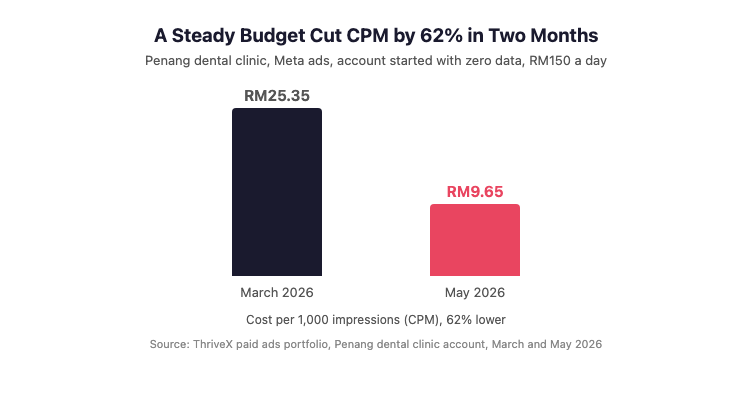
Figure 1 demonstrates that a steady budget let the delivery system learn, cutting CPM by 62% in two months on a Penang dental clinic account that started with zero data.
3. The Creative Has Run Out of Angles
When results decline after weeks of acceptable performance, creative fatigue is the first suspect. The mechanics, the thresholds Meta uses in the Delivery column, and the distinction between a fatigued ad and a never-worked ad are covered in why Meta ads stop working.
The point for this diagnosis is that more variations of the same concept do not fix it. ThriveX’s standard approach on its Malaysian accounts is to test ten new creatives a month, combining different copy angles with different visual styles, and to review performance every two weeks. The goal is to find which pairing of message and visual produces the lowest cost per qualified lead for that audience, rather than to find one winning ad.
If you run Advantage+ campaigns, the handling habits that interfere with the automation are a separate failure mode, covered in why an Advantage+ campaign is not converting.
4. Clicks Arrive but the Page Never Finishes Loading
A link click is counted when someone taps the ad. A landing page view is counted when that person taps the ad and the destination actually loads. Meta defines it that way, and offers landing page view as an optimisation event that aims at people likely to click and fully load the page.
The gap between the two numbers is a free diagnostic. If link clicks are far higher than landing page views, a share of the people you paid for left before your page appeared. On Malaysian mobile traffic, heavy hero images, sliders and slow shop themes are the usual cause.
Compare the two columns in Ads Manager. A wide gap means the page speed fix comes before any creative change.
5. The Page Does Not Continue the Ad
When the page loads, the visitor checks whether it is the thing the ad promised. If the ad showed a specific product, offer, or tone and the page shows a generic homepage, the visitor has to decide again, and many leave.
This is the mechanism behind Meta ads underperforming when the landing page breaks message match. The check is quick: put the ad and the page side by side and see whether the same offer, the same words, and the same visual tone appear in both. If they do not, fixing the page costs far less than rewriting the campaign.
6. The Page or Follow-Up Cannot Close the Sale
When clicks, loading and message match are all healthy, the loss is in the conversion step itself: the product page, the checkout, the form, or the conversation that follows the lead.
ThriveX’s clearest example is a Malaysian health supplement brand running Meta ads with a chat-commerce flow. Its ROAS stayed near 1.05x in 2024 and rose to a stable 2.5x after the post-click conversion flow was fixed, without raising the budget. The diagnosis was conversion friction in the flow, and the ads were doing their job.
Service businesses see the same pattern after the lead arrives. A KL and Johor wellness and spa brand held a phone number conversion rate above 30% on Messenger campaigns, and the diagnosis was that conversion depended more on the quality of human follow-up after the lead than on the ad creative.
Where the loss sits on the site, these posts go deeper: why a landing page is not converting, how to increase add-to-cart rate, and why customers abandon checkout. For lead-generation accounts where the number that keeps climbing is cost per lead, why cost per lead keeps rising covers the funnel side.
Diagnostic Checklist
Your Facebook ads are likely leaking somewhere other than the ad if:
Purchases or leads in Events Manager differ from what your shop or CRM records
Ad sets show “Learning” or “Learning limited” for most of the month
You have more ad sets than your budget can feed with about 50 results each per week
Link clicks are much higher than landing page views
The page the ad opens does not show the same product, offer, or wording as the ad
Your mobile conversion rate sits well below desktop
Leads are collected but nobody replies within the same day
Your last five creatives are variations of one concept
Fix Sequence
Confirm tracking: place a test order or lead and check it appears once, in both Events Manager and campaign results
Stop editing: leave ad sets alone until they exit the learning phase
Consolidate ad sets so each can reach about 50 results a week
Compare link clicks with landing page views and fix page speed if the gap is wide
Put the ad and the landing page side by side and align the offer, wording and visuals
Fix the conversion step the data points to: product page, checkout, form, or lead follow-up
Only then test new creative angles, ten a month, reviewed every two weeks
Scale budget gradually, after conversion is stable
What This Check Looks Like in Practice
Say a Facebook campaign is spending steadily, clicks look fine, and orders are well below what the platform reports. Here is how the checklist above locates the leak in about an hour.
Start in Events Manager. Place one real low-value order and see whether Meta records one purchase, zero, or two. Compare the purchase count in Ads Manager with orders in your shop for the last seven days.
Next, add the Last significant edit and Results columns to the ad set view. If most ad sets were edited in the past week and sit below 50 results, the account has been resetting its own learning.
Then compare link clicks with landing page views, open the ad on a phone, tap through, and judge whether the page confirms the offer and lets you buy without hunting for it.
Whichever step fails first is your fix list. A real case of what the last step can hide is Pretty Little Fit, an activewear brand whose Instagram and TikTok traffic had healthy click-through rates while the site lost buyers. Overall conversion sat at 1.2% against a 2.5% category benchmark. After a 90-day diagnostic-led sprint it reached 3.7%, with cart abandonment down from 78% to 56%. The full breakdown is in the Pretty Little Fit case study.
Where the ThriveX AI Audit Fits
Most of the checks above can be run inside Ads Manager. The post-click ones are harder, because the tools that report ad performance cannot show what the visitor saw and why they hesitated. That is the reason more ad spend does not mean more conversions when the constraint sits on the page, and why fixing conversion before scaling comes before another budget increase.
This is where the ThriveX AI Audit fits. It reviews the destination your traffic lands on, finds where mobile visitors drop off, and returns a prioritised fix list, so the next change goes to the part of the funnel that is losing the sale. The signals it looks for overlap with those in why your website gets traffic but no sales.
If your Facebook ads are spending without converting, the ThriveX AI Audit is priced at $49 during beta, with standard pricing at $99.
FAQ
Why are my Facebook ads getting clicks but no sales?
The loss is happening after the click. Check whether landing page views match link clicks, whether the page continues the ad’s offer, and whether mobile checkout works. Meta can deliver the click, but it cannot repair a slow page, a mismatched offer, or a checkout that asks too much of the buyer.
How long should I wait before judging a Facebook ad?
Wait until the ad set exits the learning phase. Meta says this usually happens after about 50 results in the week after the last significant edit. Judging earlier compares unstable delivery, and editing during learning resets it, which delays the point at which results mean anything.
Does increasing my Facebook ad budget fix low conversions?
Not by itself. More budget buys more clicks through the same funnel, so a leak after the click scales with the spend. A budget change can also reset learning if it is large. Fix the conversion step first, then raise spend gradually.
How do I know if the problem is my ad or my website?
Compare click-through rate with the click-to-result conversion rate. A low click-through rate points to the ad. Healthy clicks with few conversions point to the page, the checkout, or tracking. Link clicks versus landing page views separates a slow page from a weak offer.
How many creatives should I test on Facebook?
ThriveX’s standard process is ten new creatives a month, combining copy angles with visual styles, with performance reviewed every two weeks. Test different concepts rather than variations of one, and identify the winning combination of message and visual before raising spend.
How can I tell whether my Meta tracking is accurate?
Place a real test order or lead and see whether Events Manager records it once. Then compare Ads Manager results with orders or leads in your shop or CRM for the same seven days. A consistent gap means the data Meta optimises on is wrong.
Further Reading
Why Did My Meta Ads Stop Working?: https://www.thrivex.tech/blogs/why-did-my-meta-ads-stop-working
Why Is My Advantage+ Campaign Not Converting?: https://www.thrivex.tech/blogs/advantage-plus-not-converting
Why Meta Ads Underperform When the Landing Page Breaks Message Match: https://www.thrivex.tech/blogs/message-match-meta-ads-landing-page
Why More Ad Spend Doesn’t Mean More Conversions Without CRO First: https://www.thrivex.tech/blogs/why-more-ad-spend-doesnt-mean-more-conversions
Why Your Landing Page Is Not Converting: https://www.thrivex.tech/blogs/landing-page-not-converting
Why Is My Website Getting Traffic But No Sales? What Google Analytics Cannot Tell You: https://www.thrivex.tech/blogs/invisible-friction-ai-audit